 Explore the Scientific R&D Software













How do I rescale CytoFLEX and DxFLEX data so it displays as it did at acquisition?
FCS Express is fully compatible with data from the Beckman Coulter CytoFLEX and DxFLEX flow cytometers. CytoFLEX and DxFLEX data is acquired with a broad dynamic range, and when inserting a plot in FCS Express, the data may look compressed as seen in the images below at left.
| CytoFLEX data before instrument specific settings. | CytoFLEX data after using instrument specific settings. |
 |
 |
 |
 |
How the range gets set in CytExpert
In CytExpert software, the default range and the range on a plot-by-plot basis can be customized by the user. In CytExpert there are two menus that control the plot axis range:
Via Options in the Settings menu, click Plot
The default range for all plots can be customized under Axis Default Scale.
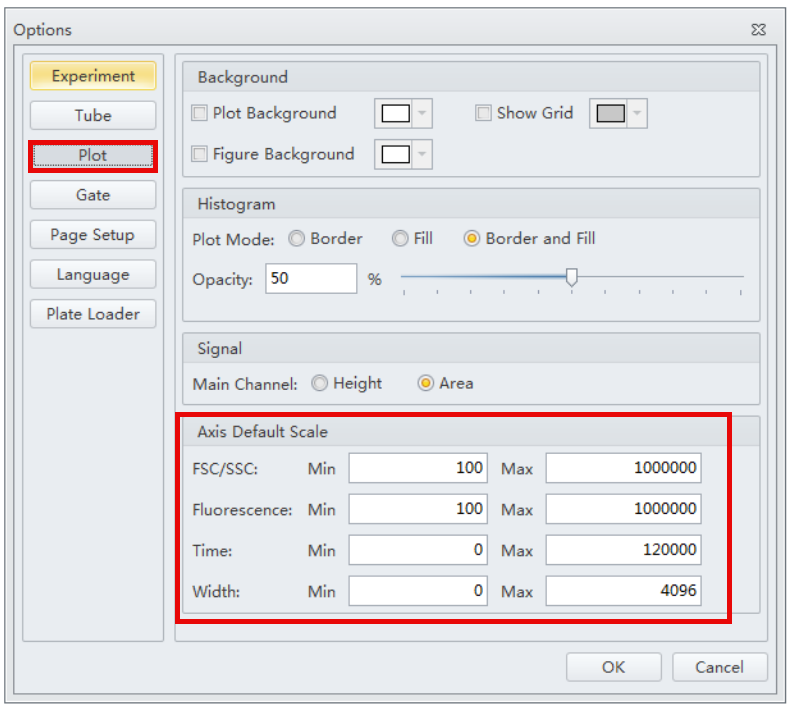
Right-click on a plot and select Property
 If Fit With Sample is checkmarked, the associated axis MINIMUM is set to be equal to the lowest value in the displayed data file for the associated parameter.
How the range gets set in FCS Express
The ranges that were applied in CytExpert are not written into the FCS file. Therefore, the default behavior in FCS Express to set the range such that all data points are visible on the plot when a data file is displayed. FCS Express does offer options that help the user customize the range.
In FCS Express, there are two places in which axis minimum and maximum are controlled:
- By default, when a plot is created and a data file is loaded on to the plot, the axis minimum and maximum are set according to the Instrument Specific Settings.
- These are found in File tab > Options > Data Loading > FCS File Options > Instrument Specific Settings
- FCS Express reads the $CYT keyword and applies the associated ISS automatically when data files are loaded into a layout.
- To review or edit the ISS for CytoFLEX data, select CytoFLEX from the list of instruments. Or if your data are from the DxFLEX, choose DxFLEX from bottom of the list.
- Axis Minimum, Maximum and scale can be set independently for Scatter parameters (e.g. FSC and SSC) and Fluorescence parameters (e.g. APC, FITC)
- You can see in the screenshot below that for CytoFLEX data, the default axis Minimum and Maximum are Based on Data for scatter parameters.
- This means the axis minimum and maximum will be set such that all data points are visible on the plot (even events that are outliers or noise). i.e. The axis minimum and maximum are equal to the lowest and highest data point values respectively.

- Within that ISS menu, if the Manual option is selected, the user can specify a minimum value and a maximum value to be used by default on all plot axes displaying Scatter parameters (see the screenshot below for an example).

- When a plot is selected and Automatic Minimum or Automatic Maximum is checkmarked, the value is sourced from the Instrument Specific Settings (described above).
- If you would like to set a custom Minimum or Maximum for just the selected plot(s), uncheck Automatic Minimum or uncheck Automatic Maximum and enter the desired custom value.

FCS Express also allows you to easily zoom to the portion of the plot that contains your relevant data so you can get results quickly. Simply right click on any plot and choose Magnify (Resolution). Draw a region around the portion of the plot to zoom to.
How to adjust the range in FCS Express to reflect my plots in CytExpert
In this example, the user wants the axis minimum to always be 0 and the axis maximum to be 1,000,000 for all FSC and SSC parameters on all plots.
If you would like FSC and SSC axes in FCS Express to always have a minimum of 0 and a maximum of 1,000,000 when CytoFLEX data is loaded into FCS Express:
- Make the adjustment to the CytoFLEX Instrument Specific Settings (as shown in the screenshot below).
- For any plots that you create, make sure that Automatic Minimum and Automatic Maximum are checkmarked for both axes within the plot's format menu.
- This is the default behavior, so it may not require any special attention.

- If you have already created some plots on your layout, Reload the data to apply the updated ISS.
- This is done in the Data tab > Reload (see the screenshot below)
- Checkmark all data files and click Reload selected files

In this example, the user wants the axis minimum to be set according to the minimum data point value and always wants the axis maximum to be 1,000,000.
That minimum value can change automatically, depending on the displayed data file. Scatter parameters (FSC and SSC) are being adjusted in this example.
Here are some steps to follow to achieve this result:
- Keep the ISS as is by default (Minimum and Maximum are Based on Data)- see the screenshot below.
- For the plots with FSC or SSC on an axis, open Axes category of the the plot's format menu:
- uncheck Automatic Maximum
- enter 1000000 for the Custom Maximum

With either option (Option 1 or Option 2), if you change the data on the plot to different data file, the axis settings are expected to be preserved
tags: axis, scale
-
Installation
-
Licenses
-
- Can I get more information regarding the Add-Ons that can be purchased with a license?
- Can I lock my template based on an electronic signature?
- Does FCS Express have any features to help meet 21 CFR Part 11 compliance?
- Does FCS Express have Quality Control features?
- Does FCS Express offer Single Sign On capability?
- How do I configure SQL Server to host a database for FCS Express?
- What database options are available when I purchase the Security option?
- What is the difference between the different types of Users that are available with a Security and Logging license?
- What is the difference between the Logging option and System Level Audit Trails?
- What SQL Server permissions are needed?
-
-
- Can I share my USB dongle or countercode license with another user?
- Can I track usage of the internet dongle?
- Can I try out the Internet Dongle before I make a purchase?
- Can the administrator log users out?
- Do you have to be connected to the internet at all times with the Internet dongle?
- How can users be added to an internet dongle license?
- How do I activate my dongle?
- How do I change my internet dongle/site license password?
- How many people can be logged in at the same time?
- How many user accounts can I create?
- If a user left the computer running can the user log themselves out from another computer?
- What are the differences between the internet dongle and network licensing options?
- What happens if I lose my internet connection?
- What happens if the user leaves the computer without logging out?
- What happens to the users login in case of an unexpected interruption? For instance, a software crash, power failure, etc.
- Why am I receiving a message that FCS Express cannot connect to De Novo Software servers?
- Show all articles ( 1 ) Collapse Articles
-
-
- Can I convert my Cytek license from the countercode licensing option to another licensing option?
- How can I claim my license purchased through BD Accuri Cytometers?
- How can I claim my license purchased through BD Biosciences?
- How can I claim my license purchased through Nexcelom Biosciences?
- How can I claim my license purchased through Sysmex-Partec GmbH?
- How can I claim the FCS Express license that came with my Cytek instrument purchase?
-
-
Layouts & Loading Data
-
- Can I customize my Quick Access Toolbar?
- For an existing layout, can I change the way FCS Express remembers parameters?
- How can I exclude histogram overlays from batch processing?
- How do I change my layout from portrait to landscape?
- How do I change the resolution of my exported images?
- How do I re-establish data files that were linked to a layout?
-
- Are Beckman Coulter LMD files unique?
- Can I find a support resource page for the analysis of Cytek data in FCS Express?
- How can I easily create the "filename" column in the "ExtraKeywords Table.csv" file?
- How can I load a Sony MA900 Index Sort file into FCS Express?
- How can I load data from the BD Accuri C6 Flow Cytometer?
- How can I load MACSQuantify files that were exported from MACSQuantify software version 3.0.1?
- How can I quickly reload all of the data files in the data list?
- How do I change the display in my plots from one data file to another data file?
- How do I export .ICE files from Thermo Cellomics HCS Studio?
- How do I tell FCS Express what plate size to use if that information is not included in the data file?
- How do I upload files to the De Novo Software FTP site?
- How do I use BD Accuri CFlow files with Multicycle DNA analysis in FCS Express?
- How do I work with images from the Thermo Scientific Attune CytPix?
- What is the Elapsed Time setting in the Gallios software and how do I convert it to real time?
- Why am I seeing a warning message when loading my Cytek data onto a layout object?
- Why are iterations in my Data List gray?
- Why are there sometimes access violations when I save and load files?
- Why do I get the message that a data file exported from a FACSDiva™ Experiment is invalid?
- Show all articles ( 3 ) Collapse Articles
-
- How are existing quadrants handled when an old layout is opened in version 7.20 and later?
- How can I set quadrants to behave like conventional gates?
- How can I set quadrants to behave like in earlier versions?
- How can quadrants be linked?
- Quadrants in FCS Express versions 7.20 / 7.24 and later
- Why does the Quadrants Options window appear when I open an older layout in version 7.24?
- Why have percentages reported by quadrants changed after updating to FCS Express version 7.20.20?
-
-
Data Analysis
-
- Caveats when using Biexponential Scaling with automatic Below Zero parameter detection in the presence of outliers.
- How can I create a merged data with equally-sized downsampled samples?
- How can I do pre-processing for high-dimensional data analysis?
- How can I explore tSNE/UMAP plots?
- How do I use SPADE?
- What is FlowSOM?
- What is T-SNE?
- What is UMAP?
-
- Can FCS Express integrate Python scripts?
- Can I use the FlowAI script in FCS Express?
- Can I use the FlowClean R Script with FCS Express?
- How can I create a matrix of autofluorescence, and import autofluorescence into EasyPanel?
- How can I recreate ratiometric data acquired in FACSDiva?
- How do I use R Integration with FCS Express?
- How does FCS Express implement software compensation?
- If my data does not have a Time parameter, can I create one?
- What is compensation?
- What is the compensation workflow in FCS Express?
- When acquiring spectral data, should my single-stained controls be "as bright or brighter" than my fully-stained sample?
-
- Can a set of quadrants be both percentile and floating?
- Can I customize the display of my data from different instruments?
- Can I disable the live updating feature?
- How can I display all of my detectors for my Cytek data?
- How can I set FCS Express so my FCS 3.0 biexponential data looks the same as it did in the BD FACSDiva software?
- How do I display Summit data in FCS Express as it appears in the Summit Software?
- How do I fix the biexponential axes on a plot?
- How do I rescale CytoFLEX and DxFLEX data so it displays as it did at acquisition?
- How do I update my density and contour plots created in Version 4 to use the newest color palette?
- What are resolution options?
- What is Biexponential and Hyperlog Scaling?
- What is the best way to set FCS Express to display FCS 3.0 data from FACSDiva on a 4 decade log scale?
- Where can I get more information regarding DNA analysis using the Multicycle AV?
- Why can’t I change my plot axis labels from the Name keyword to the Stain keyword?
- Why do I see a warning message when inserting a Spectrum Plot?
- Why do my dot plots appear sparse and blocky?
- Why is the text on the right most label cut off my plot?
- Show all articles ( 2 ) Collapse Articles
-
- Can I create an output file that contains the same plot from each data file on a single page?
- Can I export spectral data to the FCS format?
- How can I successfully export a GatingML file?
- How do the batch processing run modes differ, and why would I use them?
- Why do I get an “Old format or invalid type library” error when using Microsoft excel during batch analysis?
-
- How are statistics in FCS Express calculated compared to how they are calculated in BD FACSDiva?
- How can I display my statistical data in Scientific Notation?
- How do I calculate EC/IC Anything?
- What is “Stain Index” and how do I calculate it with FCS Express?
- What is MFI (Mean or Median Fluorescence Intensity) and how do I calculate it in FCS Express?
- Why have percentages reported by quadrants changed after updating to FCS Express version 7.20.20?
- Why is the Geometric Mean being reported as NaN or ##ERROR##?
-
-
Image Cytometry
-
- How do I adjust the axes to display small particle data from Amnis CellStream?
- How do I choose which images and parameters to view in a Data Grid?
- How do I export/save data from IDEAS software and load it in FCS Express?
- How do I make my images in the data grid larger?
- How do I pseudo-color images in a data grid?
- How do I work with Amnis derived image cytometry data in FCS Express?
-
- Can I display heat maps with my Image Cytometry data?
- Can I work with data from PerkinElmer Instruments?
- Do you offer 21 CFR Part 11 compliance options for the Image Cytometry Version?
- Do you offer image segmentation or image analysis?
- How can Attune™ CytPix data sets with images (.ACS files) be merged for high dimensional analysis?
- How do I use CellProfiler Data with FCS Express?
- How do I use ImageJ with FCS Express?
- What file formats are compatible with FCS Express Image Cytometry?
- Where can I find Nexcelom Resources and Applications?
-
-
FCS Express on Mac
-
Upgrading FCS Express
-
- Can different versions of FCS Express exist on the same computer?
- How can I view and convert my V3 layouts to FCS Express 7?
- How do I import my version 3 security databases into newer versions of FCS Express?
- How do I update Density Plots created in Version 4?
- Is there an upgrade discount from earlier versions of FCS Express?
- Version 4 Internet Dongle Retirement
- Why are my density plots from V3 not displayed correctly in later versions?
- Why are there fewer outlier dots on my FCS Express 5 and later density plots than in V4?
-
Clinical & Validation Ready
-
- Can I get more information regarding the Add-Ons that can be purchased with a license?
- Can I lock my template based on an electronic signature?
- Does FCS Express have any features to help meet 21 CFR Part 11 compliance?
- What is the difference between the different types of Users that are available with a Security and Logging license?
- What is the difference between the Logging option and System Level Audit Trails?